Notes Just Got a Major Upgrade!
If you've ever dug through a contact record looking for that one note you wrote three weeks ago, you already know the pain this update is solving. The Notes section inside your Contacts page just received a significant upgrade, and it's worth knowing about.
Here's what changed and why it matters for your workflow.
What's New
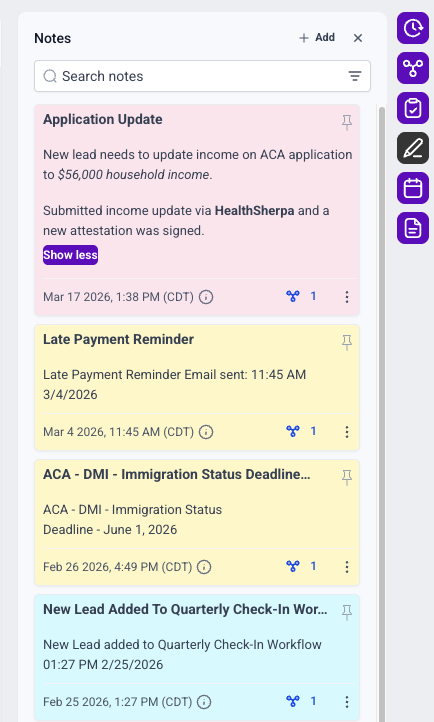
Note Titles You can now add a title to every note. This alone is a game-changer for skimmability. Instead of opening each note to figure out what it's about, a clear heading gives you instant context.
Color-Coded Labels Notes can now be color-coded, so you can build a visual system at a glance. Think: red for urgent follow-ups, yellow for pending documents, green for completed actions. Whatever system makes sense for your team.
File Attachments Supporting documents can now live directly inside a note. No more hunting through emails or Google Drive to find what was referenced in the note. It's all in one place.
Pinned Notes You can pin up to two notes to keep them fixed at the top of the contact timeline. This is ideal for information that needs to be seen every single time someone opens that contact record.
Search That Actually Works Search now runs across both the note title and the note body. If you can remember any part of what you wrote, you can find it.
How to Use It
Open any contact and navigate to the Notes section in the right panel.
Click Add Note, then enter a title and your note content.
Choose a color label, pin it if it's critical, and attach any relevant files.
Save it. Done.
What's Coming Next
Several additions are still in the pipeline:
Rich text editor for better formatting
Ability to manually rearrange notes
User tagging inside notes
Auto-save and draft functionality
Microphone dictation support
The Bottom Line
For health insurance agents running contacts through your CRM, this update makes the Notes section a legitimate documentation tool rather than a catch-all text dump. Whether you're tracking application status, flagging a contact that needs a callback, or attaching a carrier document, these features close a real gap.
If you're not using notes consistently in your workflow, this is a good reason to start.